DipCoatImage-FiniteDepth-IFD documentation#

DipCoatImage-FiniteDepth-IFD is a Python package to analyze coating layer roughness with integral Fréchet distance (IFD) in finite depth dip coating.
Installation#
DipCoatImage-FiniteDepth-IFD can be downloaded from
PyPI by
using pip:
pip install dipcoatimage-finitedepth-ifd
You can also install with optional dependencies as:
pip install dipcoatimage-finitedepth-ifd[dev]
Available optional dependencies for DipCoatImage-FiniteDepth are:
test: run unit test and doctest.doc: build documentation.dev: every dependency (for development).
Usage#
DipCoatImage-FiniteDepth-IFD provides IfdRoughnessBase, which is an
an abstract base class that implements IFD-based roughness computation.
You can either subclass it to define your own implementation, or use
pre-defined concrete class such as RectIfdRoughness.
You can use your class as a standard coating layer class in both Python runtime or in an analysis configuration file for command-line invocation. Refer to DipCoatImage-FiniteDepth documentation for more information.
API reference#
To reproduce the examples, run the following code first:
import cv2
from finitedepth import *
from finitedepth_ifd import *
- class finitedepth_ifd.IfdRoughnessBase(image, substrate, delta, *, tempmatch=None)[source]#
Base class to measure the coating layer roughness with integral Fréchet distance.
The
IfdRoughnessBasegeneralizes the \(R_q\) roughness [1] into arbitrary geometries by computing the quadratic mean of the integral Fréchet distance. Seeroughness()for more information.- Parameters:
- image, substrate
See
CoatingLayerBase.- deltadouble
The maximum distance between the Steiner points to compute the roughness. Refer to
roughness()for more explanation.
- Other Parameters:
- tempmatchtuple, optional
See
CoatingLayerBase.
References
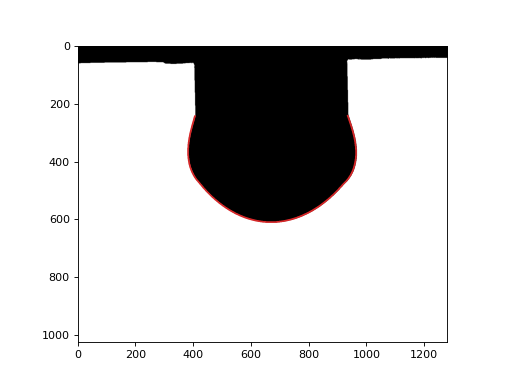
- abstract surface()[source]#
Coating layer surface points.
- Returns:
- ndarray
An \(N\) by \(2\) array containing the \(xy\)-coordinates of \(N\) points which constitute the coating layer surface profile.
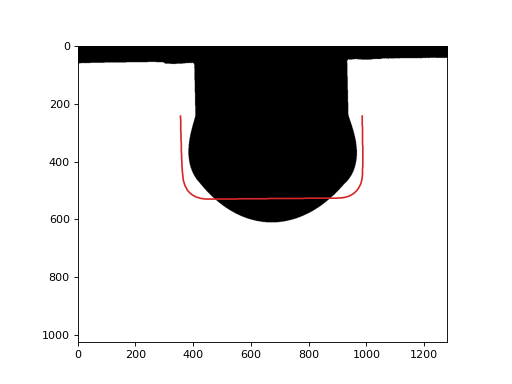
- abstract uniform_layer()[source]#
Imaginary uniform layer points.
- Returns:
- thicknessdouble
Thickness of the uniform layer.
- ndarray
An \(M\) by \(2\) array containing the \(xy\)-coordinates of \(M\) points which constitute the uniform layer profile.
- roughness()[source]#
Surface roughness of the coating layer.
Roughness is similarity between
surface()anduniform_layer(). Here, we choose quadratic average Fréchet distance as the similarity.The
deltaattribute determines the approximation accuracy. Refer to the See Also section for more details.- Returns:
- roughnessdouble
Roughness value.
- pathndarray
An \(P\) by \(2\) array representing the optimal warping path in the parameter space.
See also
curvesimilarities.averagefrechet.qafdQuadratic average Fréchet distance.
- class finitedepth_ifd.RectIfdRoughness(image, substrate, delta, opening_ksize, reconstruct_radius, *, tempmatch=None)[source]#
Measure coating layer surface roughness over rectangular substrate.
- Parameters:
- image
See
CoatingLayerBase.- substrate
RectSubstrate. Substrate instance.
- opening_ksizetuple of int
Kernel size for morphological opening operation. Must be zero or odd.
- reconstruct_radiusint
Radius of the safe zone for noise removal. Two imaginary circles with this radius are drawn on bottom corners of the substrate. When extracting the coating layer, connected components not spanning over any of these circles are regarded as noise.
- Other Parameters:
- tempmatchtuple, optional
See
CoatingLayerBase.
Examples
Note
For every example in this class, the following code is assumed to be run before.
Construct the substrate instance first.
>>> ref_img = cv2.imread(get_sample_path("ref.png"), cv2.IMREAD_GRAYSCALE)
>>> ref = Reference(
...     cv2.threshold(ref_img, 0, 255, cv2.THRESH_BINARY | cv2.THRESH_OTSU)[1],
...     (10, 10, 1250, 200),
...     (100, 100, 1200, 500),
... )
>>> subst = RectSubstrate(ref, 3.0, 1.0, 0.01)
Construct the coating layer instance.
>>> target_img = cv2.imread(get_sample_path("coat.png"), cv2.IMREAD_GRAYSCALE)
>>> coat = RectIfdRoughness(
...     cv2.threshold(target_img, 0, 255, cv2.THRESH_BINARY | cv2.THRESH_OTSU)[1],
...     subst,
...     5.0,
...     (1, 1),
...     50,
... )
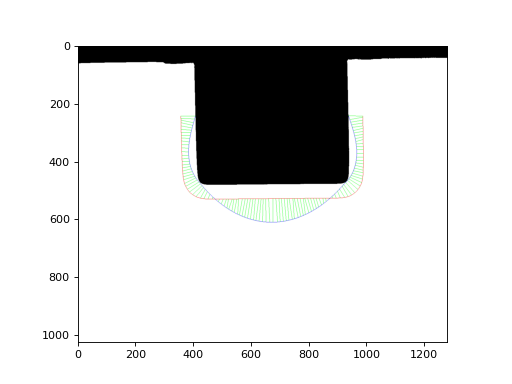
Analyze and visualize the coating layer.
>>> coat.analyze()
RectIfdRoughnessData(AverageThickness=50.25..., Roughness=44.91...)
>>> import matplotlib.pyplot as plt
>>> plt.imshow(coat.draw())
- DataType#
alias of
RectIfdRoughnessData
- valid()[source]#
Check if the coating layer is valid.
The coating layer is invalid if the capillary bridge is not ruptured.
- Returns:
- bool
- extract_layer()[source]#
Extract the coating layer region from the target image.
- Returns:
- ndarray of bool
An array where the coating layer region is True. Has the same shape as
image.
Notes
The following operations are performed to remove the error pixels:
Image opening with
opening_ksizeattribute.Reconstruct connected components using
reconstruct_radiusand and substrate vertices.
- substrate_contour()[source]#
Return
substrate’s contour inimage.- Returns:
- ndarray
Array of substrate contour points.
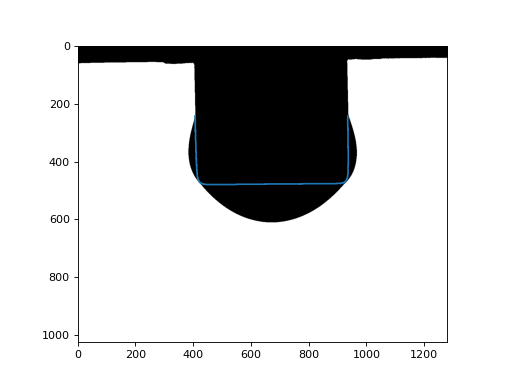
- interface_indices()[source]#
Return indices of the substrate contour for the solid-liquid interface.
The interface points can be retrieved by slicing the substrate contour with the indices.
- Returns:
- ndarray
Starting and ending indices for the solid-liquid interface, empty if the interface does not exist.
See also
substrate_contourThe substrate contour which can be sliced.
Notes
The interface is detected by finding the points on the substrate contour which are adjacent to the points in
extract_layer().Examples
>>> i0, i1 = coat.interface_indices()
>>> interface = coat.substrate_contour()[i0:i1]
>>> import matplotlib.pyplot as plt
>>> plt.imshow(coat.image, cmap="gray")
>>> plt.plot(*interface.transpose(2, 0, 1))
- surface()[source]#
See
IfdRoughnessBase.surface().Examples
>>> import matplotlib.pyplot as plt
>>> plt.imshow(coat.image, cmap="gray")
>>> plt.plot(*coat.surface().T, color="tab:red")
- average_thickness()[source]#
Average thickness of the coating layer.
Examples
>>> coat.average_thickness()
50.25...
- uniform_layer()[source]#
See
IfdRoughnessBase.uniform_layer().Examples
>>> import matplotlib.pyplot as plt
>>> plt.imshow(coat.image, cmap="gray")
>>> plt.plot(*coat.uniform_layer().T, color="tab:red")
- class finitedepth_ifd.RectIfdRoughnessData(AverageThickness, Roughness)[source]#
Analysis data for
RectIfdRoughness.- Attributes:
- AverageThicknessdouble
Average thickness of the coating layer.
- Roughnessdouble
Coating layer roughness.